Is a website down for everyone or just me? A step-by-step diagnosis
Updated October 12, 2026 · Reading time: 5 min · 5 sections
Before you reboot the router or open a ticket with your host, spend two minutes working out where the failure sits. A website that will not load can be down for everyone, broken only on your network, or blocked by something on your own device, and each case has a different fix.
I work through the same path every time, from the cheapest test to the most involved, and it rarely takes more than a handful of steps. The website checker covers the middle of that path (DNS, certificate, one reachability probe), and this guide covers the rest.
Step 1: Read the error, do not just reload
The wording of the error already narrows the cause. Chrome-style messages are the most common, and the layer they point to is fairly consistent.
| Message | Layer | First thing to try |
|---|---|---|
| DNS_PROBE_FINISHED_NXDOMAIN | DNS: the name does not exist | Check spelling, then the domain's DNS records |
| ERR_NAME_NOT_RESOLVED | DNS: your resolver could not answer | Try another network or resolver |
| ERR_CONNECTION_REFUSED | Server reached, nothing listening | Server or firewall issue, usually the owner's side |
| ERR_CONNECTION_TIMED_OUT | No reply at all | Route or firewall problem; test from another network |
| NET::ERR_CERT_DATE_INVALID | Certificate expired or clock wrong | Check your device date, then the certificate expiry |
| NET::ERR_CERT_COMMON_NAME_INVALID | Certificate does not cover this name | Try www versus the bare domain |
| 502, 503, 504 | Site reached, back end failing | Wait and retry; the owner must fix it |
An HTTP error such as 502 or 503 is actually good news for diagnosis: the name resolved, the connection worked and the certificate was accepted. The fault is on the server side.
Step 2: Walk the path
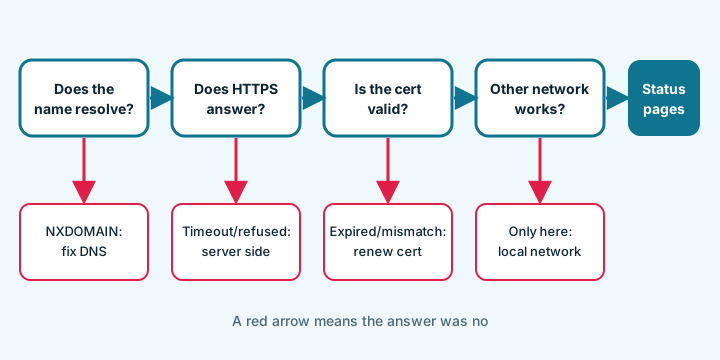
- Does the name resolve? If a lookup says NXDOMAIN, the name is misspelt, expired at the registrar, or its records were removed. A status of SERVFAIL points to a broken zone or failing nameservers. The DNS records guide explains how to tell the two apart.
- Does HTTPS answer from your browser? A reachability probe only says whether a connection came back and how long it took. It cannot tell a refused connection from a bad certificate, because the browser hides the reason from page scripts.
- Is the certificate valid for this name? Check the expiry and the coverage, as described in the certificate expiry guide. A date problem on only one device usually means that device's clock is wrong.
- Does a different network work? Switch your phone to mobile data and open the same address. If it loads there, the site is up and the problem is between you and it: your Wi-Fi, your provider, a DNS filter, or a router cache.
- Does a clean browser work? Try a private window, and then another browser. Extensions that block content, rewrite requests or force HTTPS are a frequent hidden cause, as are stale cookies and cached redirects.
- Does the other name work? Try
www.example.comandexample.comseparately. They often point to different places and use different certificates. - Is the host or CDN having an outage? Providers publish status pages. If your host or CDN reports an incident, you can stop investigating.
Step 3: Clear stale local data
Your computer remembers DNS answers for as long as their TTL allows, and a wrong or old answer can stick after the real records change. Flushing the local cache is harmless.
| System | Command |
|---|---|
| macOS | sudo dscacheutil -flushcache; sudo killall -HUP mDNSResponder |
| Windows | ipconfig /flushdns |
| Linux with systemd-resolved | resolvectl flush-caches |
Also restart the browser afterwards, because browsers keep their own short-lived DNS cache. If you changed DNS yourself in the last day or two, remember that other people may still see the old answer until the old TTL runs out; a record with a 3600-second TTL can take up to an hour to disappear from resolvers that cached it just before the change.
If it is your own site
Run through the causes that owners miss most:
- Domain expired. Registrars park an expired domain, and the site simply stops resolving or shows a registrar page.
- Certificate expired. Common, entirely preventable, and now more likely because lifetimes are shorter.
- DNS records changed or deleted during a provider or e-mail change, often the A record or a CNAME.
- Hosting suspended for an unpaid invoice or a resource limit.
- Firewall or security plugin blocking a country, a network or your own address.
- Only one of www and the bare domain configured.
Compare what DNS returns with where you think the site is hosted. If the A record points at an address your host no longer uses, the site vanishes the moment the old server is switched off.
What a single check cannot prove
Every outside check runs from one place on one network. A public tool that tests from its own server, such as Down For Everyone Or Just Me, can say how the site looks from there; it cannot see a regional outage, a block by your provider, or a problem that only appears for logged-in users. The checker on this site runs from your own browser, which makes it better at telling you about your connection and worse at telling you about the rest of the world.
If three different paths all say the site works and yours does not, the fault is local. If two networks fail and your host's status page is quiet, open a ticket and include the exact error text, the time, and which checks passed. That detail gets you an answer faster than "my site is down".
Questions and answers
How do I know if a website is down for everyone or just me?
Open it on mobile data or another network, try a private window, and run a DNS and certificate check. If it fails everywhere the site is down; if it only fails on your network or device, the problem is local.
What does DNS_PROBE_FINISHED_NXDOMAIN mean?
The DNS lookup came back saying the name does not exist. Check the spelling and, if it is your domain, look for an expired registration or deleted DNS records.
Why does a site work on my phone but not on my computer?
Different network, different DNS cache, extensions or a wrong clock. Flush the DNS cache, try a private window and check the date and time on the computer.
Can an online checker prove a site is up?
Only from where it tests. One location can confirm the site answers there, but it cannot see regional outages, provider blocks or problems after login.
How long does a DNS change take to show up?
Resolvers keep the old answer until its TTL runs out, so with a TTL of 3600 seconds expect up to an hour. Lowering the TTL a day before a planned change shortens the wait.