How to read DNS records: A, MX, TXT, SPF, DMARC and CAA
Updated October 12, 2026 · Reading time: 7 min · 8 sections
Reading DNS records is mostly a matter of knowing which of about eight record types answers which question: where the site lives, where the mail goes, who runs the nameservers, and who is allowed to send or issue on the domain's behalf. Once you can read a record line, a lookup stops being a wall of numbers and becomes a checklist.
Every example below uses reserved documentation names (example.com, example.net, and the address blocks 203.0.113.0/24 and 2001:db8::/32), so none of them points at a real service. The website checker fetches the same records for any host you type, using Cloudflare's DNS-over-HTTPS service from your browser.
The anatomy of one record line
A record has a name, a TTL (time to live, in seconds), a type, and data. The line example.com. 300 IN A 203.0.113.10 says: the name example.com has an address record, valid for caching for 300 seconds, pointing at 203.0.113.10. Low TTLs let a change spread quickly, high TTLs cut lookup traffic, and I lower the TTL a day before any planned migration so a rollback does not take hours.
The record types you meet most
| Type | Example data | What it tells you | Typical problem |
|---|---|---|---|
| A | 203.0.113.10 | IPv4 address of the host | Old address left after a move |
| AAAA | 2001:db8::10 | IPv6 address of the host | IPv6 points to a server that is not configured |
| CNAME | shop.example.net. | This name is an alias of another name | CNAME at the bare domain, or a chain that ends nowhere |
| MX | 10 mail.example.com. | Where mail for the domain is delivered, lowest number first | Wrong priority, or MX pointing at a CNAME |
| NS | ns1.example.net. | Which servers are authoritative for the zone | Registrar and zone disagree on nameservers |
| TXT | "v=spf1 ... ~all" | Free text: SPF, DMARC, verification tokens | Two SPF records, or a broken quote |
| CAA | 0 issue "letsencrypt.org" | Which CAs may issue certificates | CA missing from the list, so renewal fails |
CNAME chains
A CNAME says "ask that other name instead". Resolvers follow it, which is why an A query for www.example.com may return a CNAME line first and the address second. The checker shows the whole chain so you can see where it ends.
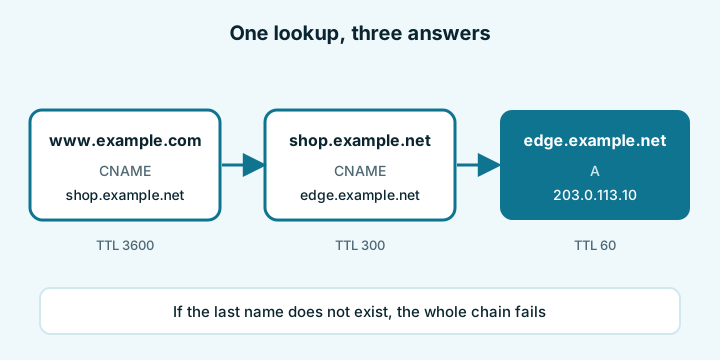
Two rules save a lot of grief. A CNAME cannot share a name with any other record, which is why the bare domain (which needs NS and MX records) cannot be a CNAME. And a chain that ends in a name that does not exist produces a site that loads for nobody, usually after the provider behind it has been cancelled.
MX priority and the null MX
Mail servers try the MX record with the lowest number first. Two records, 10 mail1.example.com. and 20 mail2.example.com., mean mail1 is preferred and mail2 is the fallback. Equal numbers share the load.
A record 0 . is a null MX: it states that the domain accepts no mail at all. That is the right setting for a domain you only use for a website. With no MX record whatsoever, sending servers fall back to the A record, which is why a web-only domain without a null MX can still receive stray mail on the web server.
TXT records: tokens, SPF and DMARC
TXT is the junk drawer of DNS, and most of what lives there matters for mail. Long values are split into quoted chunks of up to 255 characters, and the chunks are joined without spaces, so "v=spf1 include:_spf.google.com " "include:servers.mcsv.net ~all" is one record that reads v=spf1 include:_spf.google.com include:servers.mcsv.net ~all.
SPF
SPF lists the servers allowed to send mail for the domain. It is one TXT record that starts with v=spf1. The rules that bite are in RFC 7208:
- Only one SPF record per name. Two of them produce a permanent error, and receivers may ignore both.
- Terms that cause DNS lookups are
include,a,mx,ptr,existsand theredirectmodifier. More than 10 in one evaluation is a permanent error. ip4,ip6andallcost nothing.- More than 2 lookups that return nothing also fail the check.
Worked count for v=spf1 include:_spf.google.com include:mailgun.org a mx ip4:203.0.113.5 ~all: two includes, one a, one mx, so 4 lookup terms at the top level, and the ip4 and ~all are free. Every include then adds its own terms inside, so 4 at the top is comfortable, but nine includes plus a and mx would be 11 and break the record. The checker counts the top level only and says so; nested counts need an SPF-specific tool.
DMARC
DMARC sits in a TXT record at _dmarc.example.com and must begin with v=DMARC1. The key tags, from RFC 7489:
| Tag | Values | Default |
|---|---|---|
| p | none, quarantine, reject | required |
| sp | policy for subdomains | same as p |
| pct | 0 to 100, share of mail the policy applies to | 100 |
| rua | mailto: address for aggregate reports | none |
| adkim, aspf | r (relaxed) or s (strict) | relaxed |
With p=none you only collect reports and nothing is blocked. My usual order is: publish p=none with a rua address, read the reports until every legitimate sender passes, move to quarantine, then to reject. Two DMARC records on the same name mean none is applied.
CAA: who may issue certificates
CAA records (RFC 8659) name the CAs allowed to issue for the domain. 0 issue "letsencrypt.org" authorises that CA, 0 issuewild ";" forbids wildcard certificates, and 0 iodef "mailto:[email protected]" says where to report violations. A CA looks at the host first and climbs to the parent names until it finds a CAA set, so a record on example.com also governs www.example.com if the latter has none. No CAA anywhere means any CA may issue. A flag of 128 marks a tag the CA must understand or refuse. The worst mistake I see is a migration to a new CA while the old CAA line stays, so renewal fails weeks later. The certificate expiry guide covers that failure from the other end.
NXDOMAIN, no data and DNSSEC
Two different "nothing" answers hide behind a failed lookup. The status in Cloudflare's JSON is 3 for NXDOMAIN, which means the name does not exist at all, and 0 for NOERROR. A NOERROR with an empty answer is "no data": the name exists, but not with that record type. A typo in a domain gives the first, a missing AAAA record gives the second.
The AD flag in the same response means the answer was validated with DNSSEC. If it is absent, the zone is not signed or your resolver did not validate it; neither is an error on its own. The JSON format is documented by Cloudflare.
Doing it from the command line
| Goal | dig | nslookup |
|---|---|---|
| Addresses | dig +short A example.com | nslookup -type=A example.com |
| Mail servers | dig +short MX example.com | nslookup -type=MX example.com |
| DMARC | dig +short TXT _dmarc.example.com | nslookup -type=TXT _dmarc.example.com |
| CAA | dig +short CAA example.com | nslookup -type=CAA example.com |
| Status and flags | dig +dnssec example.com | not shown |
In the full dig output, read the header line: status: NXDOMAIN or status: NOERROR, and look for ad among the flags. Query the bare domain and the www name separately, because they often differ.
When the records are right and a site still fails, move on to the down-for-everyone diagnosis.
Questions and answers
What is the difference between NXDOMAIN and a lookup with no data?
NXDOMAIN means the name does not exist in DNS at all. A NOERROR answer with nothing in it means the name exists but has no record of the type you asked for.
How many DNS lookups can an SPF record cause?
At most 10 lookup-causing terms (include, a, mx, ptr, exists, redirect) in one evaluation, counting nested includes. More than that is a permanent error and receivers may reject the record.
Is DMARC p=none enough?
It is a good first step because it collects reports without blocking mail, but it does not stop spoofing. Move to quarantine and then reject once the reports show all legitimate senders passing.
Do I need a CAA record?
No. Without any CAA record any CA may issue for your domain. Adding one is a cheap safeguard, but keep it updated whenever you change certificate provider.
Why does www work but the bare domain does not?
They are two separate names. Each needs its own DNS record, and both must be covered by the certificate, so a site can be set up correctly on only one of them.