How to check an SSL certificate's expiry date, and why it is shrinking
Updated October 12, 2026 · Reading time: 7 min · 8 sections
A site that loaded fine on Monday shows a full-page browser warning on Tuesday, and nine times out of ten the cause is a certificate that quietly ran out. Checking SSL certificate expiry takes under a minute once you know where to look, and the same minute tells you who issued the certificate and which names it covers.
I check expiry in three different ways depending on what I need: the browser when I am already on the page, openssl when I want the exact served certificate from a terminal, and the website checker when I want a quick look at what Certificate Transparency logs say about a host. Each answers a slightly different question, so it helps to know which is which.
Four ways to see the expiry date
| Method | What it reads | Best for |
|---|---|---|
| Browser certificate viewer | The certificate your browser was just served | One page, right now, no tools |
openssl s_client | The certificate the server presents to the command line | Servers, scripts, checking one IP or port |
| Certificate Transparency lookup | Certificates that were logged for the name, not necessarily the one being served | Seeing every recent certificate for a host without touching it |
| Third-party SSL checkers | A fresh connection from their server, though some cache results | A second opinion from outside your network |
In the browser
Every browser hides the viewer a click or two deep, and the menu wording shifts between versions, but the route is always the same: click the icon at the left of the address bar, open the connection or security details, and choose the option that shows the certificate.
- Chrome and Edge: the icon left of the address, then the connection details, then the certificate entry. The Details tab lists "Valid from" and "Valid to".
- Firefox: the padlock, then the connection details, then "More information" and "View Certificate". Validity sits under "Not Before" and "Not After".
- Safari: click the padlock, choose "Show Certificate", and expand the details to find the expiry line.
Look at three fields, not one: the validity dates, the issuer (the CA that signed it), and the subject alternative names (SAN), which are the host names the certificate is allowed to answer for. A certificate with a perfect date and the wrong name still produces a warning.
From a terminal with openssl
This is my default when I am on a server, because it shows what the server really hands out and works on any port.
The -servername part matters: without it, a server hosting many sites may return its default certificate instead of the one for your name. The output looks like this:
notAfter=Nov 30 00:00:00 GMT
Both dates are in GMT, which is UTC for practical purposes. If you only want a yes or no for monitoring scripts, -checkend takes a number of seconds and sets the exit status:
2,592,000 seconds is 30 days. The command prints "Certificate will expire" and exits with 1 if the certificate dies inside that window, otherwise it prints "Certificate will not expire" and exits with 0. Wire that into a daily job and you have a monitor in one line.
Logged versus served: what a browser-based lookup can and cannot say
Publicly trusted CAs record the certificates they issue in public Certificate Transparency (CT) logs. Our checker queries those logs from your browser, picks the latest certificate that covers the host, and shows the issuer, the SAN list, the dates and a countdown. That is useful and fast, but it is a record of issuance, not a snapshot of the live handshake.
The gap shows up in real setups. A load balancer may still serve an older certificate on one node, a CDN may present its own, and a renewal that was issued but never installed will look healthy in the logs while visitors still get the old one. When the logged certificate and the browser warning disagree, trust the browser, and use openssl or the certificate viewer to see what is actually served.
Turning dates into days left
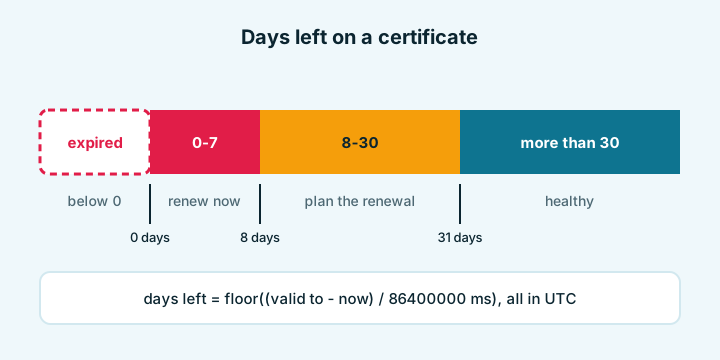
Work in UTC and round down, because a certificate that has 10 days and 8 hours left should be treated as having 10 days. A worked example with a hypothetical shop certificate:
- Valid to 2026-10-18 at 07:59:59 UTC.
- Checked at 2026-10-08 at 00:00 UTC.
- Difference: 10 days 7 hours 59 minutes 59 seconds, so 10 days left.
With the thresholds in the figure, that lands in amber. A 90-day certificate that close to the end tells me automatic renewal has probably stopped, so I go and look at the renewal job rather than wait for it to catch up.
Why certificates now expire sooner
The CA/Browser Forum ballot SC-081v3 cuts the maximum lifetime of publicly trusted certificates in steps. I describe it simply as the 200-day limit now in force, dropping to 100 days and then 47 days. The exact dates are in this table, and certificates issued before a step keep the older limit until they expire (DNSimple's announcement summarises the change).
| Issued on or after | Maximum lifetime |
|---|---|
| earlier than 2026-03-15 | 398 days |
| 2026-03-15 | 200 days |
| 2027-03-15 | 100 days |
| 2029-03-15 | 47 days |
The practical consequence is simple: renewal can no longer be a yearly chore you remember. It has to be automated, and the automation has to be watched. Let's Encrypt has also stopped sending its expiry reminder e-mails (they used to arrive about 20 and 7 days before the end), so silence from the CA no longer means everything is fine (their explanation).
My rule of thumb for ACME clients: renew when about a third of the lifetime is left, and alert when fewer than a quarter remains. With today's limit that means renewing around day 130 of 200 and shouting at day 150; as lifetimes shrink, both numbers shrink with them, so set them as fractions rather than fixed day counts.
Names: wildcard and SAN coverage
Dates are only half the story. A certificate is valid for the names in its SAN list, and a wildcard covers exactly one extra label.
| Host | Covered? | Why |
|---|---|---|
| www.example.com | Yes | One label in place of the star |
| example.com | No | Nothing left to match the star |
| a.b.example.com | No | Two labels, the star covers only one |
The bare domain is the classic trap: a wildcard-only certificate leaves https://example.com with a name-mismatch error while www works. Make sure the bare name is listed as its own SAN entry.
If the certificate has already expired
- Confirm which name and which certificate. Check www and the bare domain separately, and any other host such as a mail or API name.
- Get a new certificate from your CA or hosting panel, or run your ACME client manually and read its error output.
- Install the full chain (your certificate plus the intermediates), not the single file. Missing intermediates produce errors on some devices and not others.
- Reload the web server or the load balancer, and clear the CDN cache if one sits in front.
- Re-check from a second network, then find out why automation failed: a blocked challenge port, a changed DNS record, a CAA record that does not list the CA, or a cron job that was lost in a server move.
Last, check the clock on the device that shows the warning. A laptop with a wrong date makes a perfectly good certificate look expired or not yet valid.
Related reading: how to read DNS records explains the CAA record that limits who may issue, and is a website down for everyone or just me walks through the rest of the diagnosis when the certificate turns out to be fine.
Questions and answers
How can I check an SSL certificate's expiry date quickly?
Click the icon left of the address bar, open the connection details and view the certificate; the Valid to or Not After line is the expiry date. From a terminal, pipe openssl s_client into openssl x509 -noout -dates.
How long are SSL certificates valid now?
Certificates issued before the first step of the CA/Browser Forum schedule keep up to 398 days. The current limit for new ones is 200 days, falling to 100 and then 47 days in later steps.
Does Let's Encrypt warn me before my certificate expires?
No. Let's Encrypt has ended its expiry reminder e-mails, so you need your own monitoring or a working automatic renewal job.
Why does the checker say a certificate is fine but my browser shows an error?
The lookup reads Certificate Transparency logs, which record what was issued, not what your server presents. A renewed certificate that was never installed, or a different one on a CDN, causes this.
Does a wildcard certificate cover the bare domain?
No. A certificate for *.example.com covers www.example.com but not example.com itself, so the bare name has to be listed separately.